Hyperspectral image formats
A hyperspectral image is a raster like any other, just with far more bands. This page explains how to think about that structure and covers the three file formats you're most likely to meet: GeoTIFF (which Wyvern delivers), ENVI, and HDF5.
The number of bands is the main thing that sets hyperspectral data apart, and it's also why the files are large:
| Satellite | Type | Bands | Common format |
|---|---|---|---|
| Sentinel-2 | Multispectral | 13 | JPEG2000, GeoTIFF |
| Landsat 8 and 9 | Multispectral | 11 | GeoTIFF |
| Sentinel-1 | SAR | 1–2 polarizations | GeoTIFF |
| Wyvern Dragonette | Hyperspectral | 23 or 31 | Cloud-Optimized GeoTIFF |
The data cube
A hyperspectral scene is easiest to picture as a cube: two spatial axes, x and y, and one spectral axis, the bands. Slice the cube at a single band and you get a greyscale image. Take three slices and assign them to red, green, and blue, and you get a colour composite. Take one pixel and read straight down through every band, and you get that pixel's spectrum, which is where most hyperspectral analysis starts.
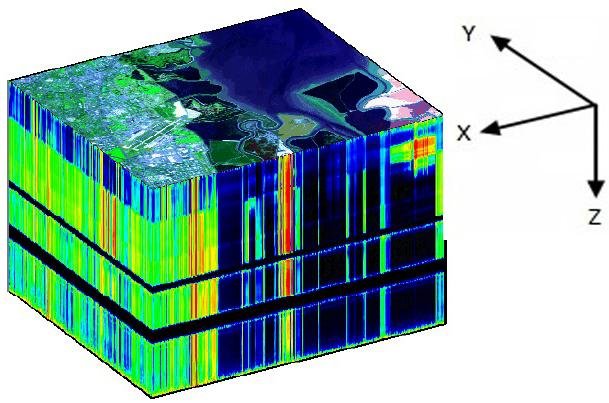
A hyperspectral data cube. The top face is the image; depth is wavelength. [1]
Once it's loaded, the file format stops mattering: every raster becomes an array of numbers with a location attached. If you're not sure whether a tool can read a file, try GDAL. It reads almost everything.
Common formats
These are the three formats you'll meet most often with hyperspectral data. GDAL's raster driver list covers the rest.
GeoTIFF .tiff
GeoTIFF is a TIFF image with embedded georeferencing, so a single file holds both the pixels and where they sit on the Earth. It was developed by Dr. Niles Ritter at NASA JPL and is now an Open Geospatial Consortium standard. It has variants for different settings, including BigTIFF for very large files and Cloud-Optimized GeoTIFF.
Wyvern delivers imagery as Cloud-Optimized GeoTIFF (COG). A COG is a regular GeoTIFF with its data arranged in tiles and overviews, so software can read just the part it needs over HTTP instead of downloading the whole file. Each band's centre wavelength and FWHM are stored as tags in the file, so you get the spectral metadata along with the pixels.
Wikipedia article on the GeoTIFF standard
Open Geospatial Consortium GeoTIFF standard
ENVI .img and .hdr
The ENVI format is the native format of NV5's ENVI software, and it's widely used for hyperspectral data. It comes in two parts: a binary image file and a plain-text header, usually with a .hdr extension. The header is where ENVI stores band names, wavelengths, and FWHM, and because it's plain text you can open it in any editor to check what a file contains. AVIRIS data is distributed in this format. GDAL (along with rasterio and any other tool based on GDAL) can read and write it.
HDF5 .h5
HDF5 is a scientific data format maintained by the non-profit HDF Group. It's organized like a file system: named groups contain datasets or further groups, and metadata is attached to each. NetCDF4 is built on HDF5 and is worth knowing about because it's what NASA's EMIT mission uses, and because the xarray library in Python reads it directly, keeping band and coordinate labels attached to the array. PRISMA uses an HDF5 variant, HDF-EOS5.
Wikipedia article on the HDF standard
More resources
GIS Geography's list of GIS formats
References
[1] Pizzolante, Raffaele & Carpentieri, Bruno. (2012). Visualization, Band Ordering and Compression of Hyperspectral Images. Algorithms. 5. 10.3390/a5010076.